cb77 App: Slots, Cricket & More in Your Pocket
The official cb77 App puts over 4,600 games and live cricket betting on your Android phone. Free APK download, no sign-up needed to install. Works on any Android phone running version 6.0 or higher. File is 36 MB — takes about 30 seconds on a standard mobile connection.
- Verified APK
- Android 6.0+
- bKash & Nagad
- 24/7 Support
- 18+ Only
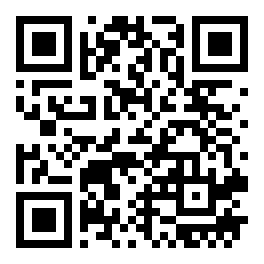 Scan to download
App vs. Website: What's Different?
Both the cb77 App and the browser version connect to the same account and wallet. The app adds a few advantages that matter on a mobile connection — faster load times, push alerts for match results and deposit confirmations, and a one-tap login with your fingerprint.
| Feature | cb77 App (APK) | Browser Version |
|---|---|---|
| Load speed on mobile data | Faster — cached assets, no re-download each visit | Reloads full page on each visit |
| Login method | Fingerprint / PIN + username | Username & password only |
| Push notifications | Deposit, withdrawal, match alerts | Not available |
| Home screen shortcut | App icon on launcher | Manual browser bookmark only |
| bKash / Nagad deposit flow | Direct in-app redirect, no copy-paste PIN | Browser redirect (extra steps) |
| Game library | Full 4,600+ games | Full 4,600+ games |
| Requires app store | No — direct APK download | No — open in any browser |
| Works on iOS (iPhone) | Android only (use browser on iOS) | All devices |
| Account same as website | Yes — single wallet | Yes — single wallet |
Already have an account? Log in on the app with your existing username and password — no re-registration needed.
System Requirements & Version Info
Before you tap download, check the table below. Most Android phones sold in Bangladesh since 2017 meet these requirements. If your phone is running Android 5 or below, use the browser version instead — the experience is nearly identical.
| cb77 App — Technical Specifications | |
|---|---|
| Version | 2.9.19 |
| File Name | cb77.apk |
| File Size | 36 MB |
| Minimum Android | Android 6.0 (Marshmallow) or higher |
| Last Updated | 9 November 2026 |
| Price | Free |
| Language | English / Bangla |
| Available on Play Store? | No — direct APK only |
Security & Permissions: What to Expect
The cb77 App requests only the permissions it actually needs. No access to your contacts or SMS. The APK is scanned before each release and distributed only through the official cb77 website at cb77.mobi.
What You Can Play Inside the cb77 App
Full CasinoEvery game category on the website is accessible inside the app. The lobby loads in the same layout you see on a desktop browser, optimised for one-thumb navigation on a 6-inch screen.
Slots & Fishing Games
Over 4,600 titles including Dragon Hatch (Red Tiger, RTP 96.1%), Wild Bandito (Pragmatic Play, RTP 96.3%) and Pirate Fishing (JILI, RTP 97.5%). Filter by provider — JILI, KA Gaming, Habanero and more — directly in the app lobby.
Cricket & Football Betting
Bet on BPL, IPL, T20 World Cup and domestic ODI matches with live in-play markets. The sportsbook section of the cb77 App refreshes odds every few seconds — results come through as push notifications if you allow them.
Live Dealer Tables
Ezugi and Pragmatic Play power the live casino section. Baccarat, Roulette and Andar Bahar tables stream at up to 60 fps. The app handles video better than a browser tab — no buffering interruptions when you switch between tabs.
Crash Games
Spribe's Aviator and similar crash titles are in the app under Instant Games. Tap to cash out at any multiplier before the round ends. The app's lower latency compared to a mobile browser makes timing your exit more reliable.
bKash & Nagad Deposits
Tap Deposit, choose bKash, Nagad, Rocket or Upay, and the app opens the payment app directly. Minimum ৳100 per deposit. Funds reflect in about 6 minutes. The app sends a push notification when your balance is credited — no need to refresh manually.
Bonuses & VIP Tracking
Your 220% welcome bonus progress, daily cashback rate (1.8% at Member tier) and VIP level are visible on the app home screen. Referral bonuses — ৳400 per successful invite — are credited and visible under My Bonuses in the app within minutes.
Popular Titles in the App Lobby



How to Install the cb77 APK on Android
Android blocks APKs from outside the Play Store by default. The steps below walk you through enabling the one setting that lets you install the cb77 App. You only need to do this once — after that, future updates install automatically.
-
1
Allow Installation from Unknown Sources
Open your phone's Settings → Security (or Privacy on some Samsung devices) and toggle on Install Unknown Apps. On Android 8 or higher you grant this permission per-app — allow it for your browser or file manager, whichever you use to open the downloaded file. This takes under 30 seconds.
-
2
Download the cb77 APK File
Tap the Download APK Free button on this page. Your browser will save
cb77.apk(36 MB) to your Downloads folder. Wait for the progress bar to reach 100% before moving to the next step — a partial download will not install correctly. -
3
Open the APK and Tap Install
Pull down your notification shade and tap the completed download notification. Android will show you a permission screen listing what the app can access. Review the list — the cb77 App only asks for internet and storage — then tap Install. Installation takes about 15–20 seconds.
-
4
Open the App and Log In
Tap Open when Android finishes installing, or find the cb77 icon in your app drawer. If you already have a cb77 account, enter your username and password — your wallet balance and game history carry over automatically. New user? Tap Register inside the app to create your account and claim the 220% welcome bonus up to ৳9,000.
-
5
Make Your First Deposit via bKash or Nagad
Go to Wallet → Deposit, choose bKash, Nagad, Rocket or Upay, and enter an amount from ৳100 upward. The app redirects to your payment app, confirms the transaction, and credits your cb77 balance in about 6 minutes. You are ready to play — no browser needed from this point forward.
iPhone Users: Add cb77 to Your Home Screen
Apple does not allow sideloaded APKs. iPhone users access cb77 through Safari and can pin the site as a Progressive Web App — it looks and feels almost identical to a native app.
- Open Safari and go to cb77.mobi. Chrome and Firefox on iOS do not support Add to Home Screen fully — use Safari specifically.
- Tap the Share icon (the box with an upward arrow at the bottom of the screen). Scroll down the share sheet until you see Add to Home Screen.
- Tap Add to Home Screen, confirm the name as cb77 and tap Add in the top-right corner. The cb77 icon now appears on your home screen like a regular app.
- Open the icon — cb77 loads in full-screen mode without the Safari address bar. Log in with your existing account or register directly inside the web app. All features including bKash deposits work the same way.
Installation Problems? Fix Them Here
Most errors during cb77 APK installation come down to one or two fixable settings. The table below covers the five most common issues reported by players in Bangladesh, their causes and the fastest solution.
| Error / Problem | Most Likely Cause | Fix |
|---|---|---|
| "Install blocked" message after tapping the file | Android's Unknown Sources (or Install Unknown Apps) permission is still off for your browser or file manager | Go to Settings → Security → Install Unknown Apps, find your browser (e.g. Chrome), and toggle it on. Then tap the APK file again. |
| Download stops at 60–80% and fails | Unstable mobile data connection dropped the file transfer mid-way | Switch to a stable Wi-Fi network or move to a better signal area. Delete the partial file from Downloads, then tap Download APK again from cb77.mobi. |
| "App not installed" after tapping Install | An older version of the cb77 App is still on the device but cannot be overwritten — usually a signing mismatch from an unofficial APK installed previously | Uninstall the existing cb77 App (Settings → Apps → cb77 → Uninstall), then install the fresh APK from cb77.mobi. Your account data is stored server-side — nothing is lost. |
| App installs but crashes on launch | Device is running Android 5.x or lower, which is below the minimum supported version (Android 6.0) | Use the cb77 mobile website at cb77.mobi instead — it supports older Android versions without any installation required. All games and payment methods are available. |
| bKash redirect opens blank screen inside the app | Default browser inside the app does not have permission to open external apps, or the bKash app is not installed | Make sure the bKash app is installed and up to date. If the blank screen persists, tap the three-dot menu inside the cb77 App browser and choose Open in System Browser — the deposit will complete normally from there. |
Problem not listed here? Open 24/7 Live Chat from the app's Help menu — a support agent will walk you through it in real time.
Download the cb77 App for Android
-
Faster on mobile data
Cached assets mean no full-page reload on every visit. Games open in a tap, not a wait.
-
Fingerprint & PIN login
Skip typing your password every time. One touch and you're in your account.
-
Push alerts for deposits & matches
Get notified the moment your bKash deposit lands or a live cricket match starts.
-
Verified, safe APK
Version 2.9.19 · 36 MB · Android 6.0+ · Free to download, no app store needed.
Scan to download
on your Android phone
Questions About the cb77 App
Is the cb77 APK safe to install on my phone?
Why do I need to allow "Unknown Sources" and is it risky?
How do I update the cb77 App when a new version comes out?
Can I use the same account on both the app and the website?
Does the cb77 App work on iPhone or iPad?
What is the minimum deposit I can make through the app?
What should I do if the APK download link does not work?
18+ · Play Responsibly · BDT transactions only · Responsible Gaming